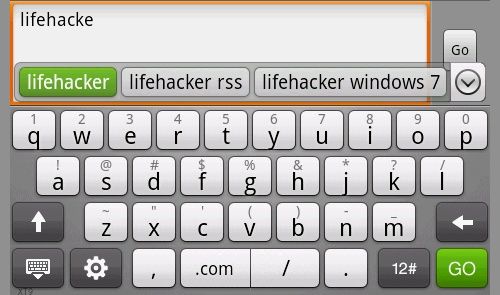
 One of the biggest gripes I’m hearing on the Sony Ericsson Xperia X10 relates to keyboard input. People are having problems with letters needing several touches before being recognised as well as inaccurate text entry. Some say that this is just a function of a capacitive display, but personally I have had no problems with the keyboard (so far!)
Given these problems, I thought it may be worth letting people know how they can change the default keyboard that hopefully results in a more harmonious experience. If you want to try the stock Android keyboard then head over to Settings > Locale and Text. Long press in a text box and choose Input Method and then select your keyboard of choice.
However, to get the most out of the X10, it’s worth installing the HTC Touch Input (HTC_IME) keyboard (you can download the latest version here). As an ex-HTC Hero owner, the keyboard really is a step above the X10 and is well worth the effort to try and install. You can read step-by-step instructions on exactly how to do this after the break.
Instructions on installing the HTC keyboard on the Xperia X10
1. Firstly you should prepare your X10 for third party software installations:
-Press the MENU key and follow Settings > Applications
-Ensure Unknown Sources is ticked
You will receive a warning when ticking this box and you should of course be careful that you only install software of trusted source2. Next you should install a file manager which is capable of handling .apk files for installation:
-Download a free file manager from the Android Market such as Astro
Other file managers are available
Alternately you can install apk’s directly from your PC with this software3. Now you can download the HTC keyboard and transfer it to your SD card:
-Attach your phone to the USB cable and, via the “USB Connected” notification, choose Mount for file transfer
You may need to setup the drivers if you haven’t already installed the Sony Ericsson software
-Alternately you can remove your SD card and access it through a USB reader-Download the latest highres version of this modded HTC_IME
All credit goes to jonasl-Save the zip file to your computer and extract the files .htcime, HTC_IME.apk & Clicker.apk
-Copy .htcime to your SD root directory
This file contains setup information for the modded keyboard-Copy HTC_IME.apk to your chosen location of the SD card
This file installs the HTC Touch Input keyboard-Copy Clicker.apk to your chosen location of the SD card
This file enables screen calibration and is optional4. You can now disconnect your X10 from the computer and install the apk’s:
-Select Turn Off USB Storage from the Android notification bar and press Turn Off
-Open the file manager you installed in step 2 and browse to the location you saved the apk files to.
-Click on HTC_IME.apk and select Open App Manager
The options may vary in different file management apps-Press Install to begin the installation or Upgrade if installing over an older version
-Follow the installation process as normal then press Done and return to your file manager
-Click on Clicker.apk if you wish to install the calibration tool and follow as above, skip this step if you do not wish to use the calibration5. The keyboard is now installed but needs to be activated as an input option:
-Press the HOME key then MENU and follow Settings > Locale & Text
-Ensure Touch Input is ticked
-Now long press any text input box and choose Input Method where you will see the new Touch Input option
-Select this and enjoy vastly improved typing on your Xperia X10
Via SE-NSE Forums.
80 responses to “Installing the HTC keyboard on the Xperia X10”
Great Blog!
Please don’t hezitate to add more posts on basics and must have applications for the X10
Keep it up!
Good work guys,keep going!
😉
Does this keyboard support also other languagges or english only?
Do you have any idea for sms delivery reports? A good app or smthng..
Thank u
Worked perfectly thanks! Makes a big difference for someone like me who texts a lot. The Sony keyboard sucked big time!
Thank you very much! This is by far better than the one that came with the x10.
This is the greatest and friendy steps that have provided in this website. Now I can enjoy the same input as my previous HTC Hero. Using my HTC phone pad.
Many Thanks on this great discovery!
Nice one. It works, but the support for Scandinavian letters is limited. Even when “Scandinavian hack” is activated there are no exclusive keys for the letters æøå that normal Norwegian keyboards do have.
How about Swype? Has anyone tried that?
is there an easier way of getting this on my phone? i don’t have access to another pc to do the link up thingy 🙂
Thanks for this. It worked perfectly. The new keyboard is definitely more responsive and quicker.
[…] of markets and one of the biggest negative points I’m hearing on the handset (apart from the keyboard) is its battery […]
thank you so much for this. keep up the good work. im bookmarking this site.
[…] Originally Posted by Alfredjms Hey Dave – I tried looking for both of those keyboards in the market and couldn't find either of them! Are the exact names for each "BETTER KEYBOARD", and "HTC KEYBOARD"?, and are they both free?? thanks… Better Keyboard is $2.99 USD, and should be available in the market for you on Rogers (it is for me). The HTC_IME keyboard isn't available through the market to my knowledge. You can find installation instructions and the download here: Installing the HTC keyboard on the Xperia X10 | Xperia X10 Blog […]
[…] keyboard. For anyone looking for it for your X10, here's some instructions on how to install it: Installing the HTC keyboard on the Xperia X10 | Xperia X10 Blog __________________ Sony Ericsson Xperia X10a | Android 1.6 | Baseband: 1.0.14 | Kernel: […]
Well done,
I’ve installed the keyboard 30 minutes ago and it works really great on my X10.
It also had a lot of functions.
Keep up the good work!
Is this safe though? How can you tell if there is a keylogger embedded in the script? If there is that’s passwords and credit card details gone… Any advice?
I just installed it and it is seriously AWESOME!!!!
I’ve got swype on my x10 and it’s an absolute dream. I strongly recommend it.
I just installed it and now when i long press on the input box and select the method it only shows the standard, android and japanese keyboards not the htc one
Well I agree with MM97 , what if it has a keylogger inside?
I will install this keyboard because I saw everywhere that X10 owners don’t like the keyboard that comes by default
maybe a virus-scan of the SD can help… thats my idea 😀
I was having the same problem, mainly with the A and L key, just wouldnt seem to recognise on certain occasions and words would just make no sense :p
Trying the android keyboard now, so far seems better, but will see when I’ve sent a few more texts. Hey, I am on an unlimited package afterall ^^
[…] and looks the way you want it to. For example, the default keyboards are… well, ordinary. The HTC keyboard on the other hand works amazingly well for me, I can type as fast as I used to with my iPhone […]
this is great keyboard!
I get a tiny keyboard. I did this on a Nexus One and it worked perfectly.
why is there no download links on android market
I dont have andriode market
Ive installed the HTC keyboard but it is really small!!?? How can I make this bigger or is this how it is meant??
Thanks
pls how an i set a mp3 as sms tone
THANK YOU! this worked incredibely well and im was very pleased with the instructions because im pretty new to this stuff. worked awesome new keyboard is fantastic
I installed this keyboard an hour ago and trust me it works wonderfully.. this is just so cool, I’ve never experienced working on a keyboard like this before..
I was so frustrated with my new X10 because of this buggy keyboard that I was thinking in exchange it for an Iphone. 😀 Thank you very much for this tip, now my X10 text input it’s fantastic!
Tried this on my x10mini but the hi-res version doesn’t show any keyboard at all. The low-res shows the left part of the keyboard. Has anyone gotten the keyboard to work with the mini?
Very cool application. Thank you for this board. I really like it….
I’m having exactly the same issues as QAN and have tried V27, 20, 23 and 24 (hi and lo res)
Anyone know what the problem is?
Ineed a keyboard for th xperia mini too
plz help!!!! a full keybord!!!!
Thanks for this tutorial 🙂 It’s very usefull keyboard 🙂 Maybe I didn’t understand the installation at the first moment but later it came easily to happy end 🙂
this keyboard is fast! bye2 sony keyboard 😀
[…] keyboard if you want a new one it's pretty sweet but it's not on market Here's how to install it Installing the HTC keyboard on the Xperia X10 | Xperia X10 Blog There's another one called swipe and it works differently to normal keyboards some like it but I […]
Just installed this, absolutely fantastic! Makes my X10 a joy to type on! Thanks sooooo much! 😀
[…] Installing the HTC keyboard on the Xperia X10 | Xperia X10 Blog […]
Hi
I have very little problem, can you please tell me how can i go to next line while writing a sms or email, for example, i want to write like
”
Hi.
I Will be there in 15 mints.
Thx.
”
but i cant write like that, when i write it looks like
“Hi. i will be there in 15 mints. thx.”
Can you please let me know if you knw any solution. I will be thankful for your help.
Excellent keyboard. Up until a few minutes ago I was thinking of going back to a BB becauase of the buggy Ericsson keyboard. Now I am very happy with my phone.
Thanks alot
“-Copy .htcime to your SD root directory
This file contains setup information for the modded keyboard”
Where is the root directory for SD? I cant find it. Thanks
The “root” of you SD Memory card is technically not a folder, its simply the card itself, the “top level” of your SD card where all the directories are contained.
[…] installed (under this heading I have Swype, HTC_IME mod, Android keyboard, Vlingo keyboard) This blog entry should sort you […]
This keyboard rules so hard. I love the tactile feedback and the familiarity of the T9 input. Going from typing on actual keys using T9 to a QWERTY keyboard with little tiny keys on a touch screen cut my texting time in half (at least); this HTC keyboard is a great solution though. Seriously recommended for any X10 owner who’s fed up with a tedious default input.
Hey well its a little complicated to understand the installation process it would be great if someone could upload the installation steps with screen shots it would be much easier to understand. thnx
i dont have the option to disaple unknown sources how do i get around this
Very excellent keyboard, love it, suggest it to all xperian…
Thank you so much …fantastic. Hero input is far better and im delighted to have it on my xperia, thanks again.
Anyone tell me how to make it bigger? like poster 22 downloaded it and when selecting its more than half size?
Is this how its meant to be?
I can’t add unknown sources, the setting isn’t there. Please help! X10a
5. The keyboard is now installed but needs to be activated as an input option:
-Press the HOME key then MENU and follow Settings > Locale & Text
-Ensure Touch Input is ticked
-Now long press any text input box and choose Input Method where you will see the new Touch Input option
-Select this and enjoy vastly improved typing on your Xperia X10
I dont understand this step. Please explain in a way a layman can understand. Sorry, but I am not a techy person!
Very impressed, much more responsive and accurate than the standard keyboard! Thanks!
Hi just bought this phone and it has every language on it except the one I want – Japanese. Anyone know if I can put Japanese language on this phone and how?
thanks
thanks for your soulition..! it’s very helpfull for me..
Would have been awesome except like “miles” I dont have the box stating anything about “unknown sources” got super excited now just bummed. Help me out a little would ya. Everything else is done, tried to do the install….no go!
I’m trying to install this keyboard and my xperia x10 keeps telling me that I am not allowed to download from a third party. I can’t find something under “applications” that is called “unknown sources,” so I don’t know how to open this up to load. Could you help me with that? Thanks.
Try SwiftKey from the Android Market. By far the best keyboard I’VE used.
Hi, I have the same problem as Laura and other posts when trying to install apps outside Android Market, Install Block message, etc., I have a Sony Ericsson Xperia X10a AT&T firmware 1.6 build # R2CA016. Thank you in advance.
hi,first of all, the keyboard looks really great and seems really easy to use….except i have one big issue…the keyboard is REALLY small, and it takes about 1/2 of the length?!
any solutions..?!
Just installed v27 on my X10 running branded 2.1
Keyboard is so tiny and I got phat fingers.
Anybody know a version with bigger keys?
I want something along the size of new stock 2.1 kb.
I had it running on 1.6 but can not get it running on the 2.1 update I’ve installed today. The box is ticked in the setting but the original keyboard is only available
Hi. How can I calibrate screen with this one??? thanks
no one knows? cmon!!!
I tried this today on 2.1 and couldn’t get it to work until I went to menu->settings->keyboard and input and found the HTC options at the bottom of the list, including the calibration option. From there, once it was activated, I could select it in the input selection.
Text prediction is much nicer now.
there is nothing about calibration…or I cant find it…
just found it!!! thank you statik!!
Can anyone help me im on andriod 2.1 and when i try to install the HTC_IME_hi and the Clicker_hi it says “For security, your phone is set to block installation of applications not sourced in Android Market” does anyone know how to get around this? Please help me thank you
i also tried installing it while USB debugging was on and it still didn’t work
Use the japanese keyboard on english settings, I do not know why but it is leet. Play with it for a while and you too will see. The only thing is to turn the full screen sentence builder to landscape one row
On my phone there is no option for Unknown Sources, pleeeaaasse help, I’m still on 1.6 update hasn’t come in the US yet
Doesn’t work on my x10 2.1 ! =(
The keyboard is too small ! Just half of my screen ! I tried the calibration but it didn’t work =/
Is it for rooted users only ?
HELP !
Worked perfectly, no issues at all, easy to set up and improved texting instantly.
No issues with non-Rooted Xperia x10 on 2.1
How do you use the screen calibration with this app? I have the key bored and it is great
thank you much! its working great!
keyboard farsi for xperia x10i 1.6
Hi! I am looking for a download to read and write in Arabic with my xperia (sms). Does anybody know????
“Given these problems, I thought it may be worth letting people know how they can change the default keyboard that hopefully results in a more harmonious experience. If you want to try the stock Android keyboard then head over to Settings > Locale and Text. Long press in a text box and choose Input Method and then select your keyboard of choice.”
Thank you, thank you! I just came to my xperia and discovered it had registered a whole lot of weird stuff (including creating a few new events in my calendar, with event titles like ‘yyyyyyy’!), and changed from qwerty to the number pad layout. And when I looked at the onscreen keyboard, the alpha characters were bold and the numeric were still all normal. I fiddled for a while and managed to change it back to qwerty (hm, the sales guy told me that was possible when I bought it and I’d been meaning to find out how to – I wonder if I can remember what I did) but couldn’t work out how to fix the bold type, and finally found your instructions. A long press in a text box, selected “input method” and altered it back to default, and problem solved.
Thanks again.
does this keyboard have a romanian language?
God